
Downloading TikTok videos without watermarks is no longer difficult thanks to the support of completely free third-party tools. This article will guide you through the simplest and most effective ways to download sharp, high-quality videos in just seconds.
Why is there such a high demand for downloading TikTok videos without watermarks?
Before we get into the steps, we need to understand why users prefer tools that download videos without watermarks over TikTok's built-in "Save video" feature:
- Enhance the aesthetics: A clean video, without logos, helps viewers focus entirely on the main content, especially landscape or mood videos.
- Creating creative materials: Editors often need to download watermark-free TikTok videos for editing, voiceovers, or as reference material, without wanting copyright symbols overlapping the images.
- Upload to multiple channels: If you want to share videos from TikTok to Facebook/Instagram Reels or YouTube Shorts, these platforms often restrict their display if they detect that the video contains a competitor's logo.
- Image quality: Tools that support downloading videos without watermarks often offer the option to download in HD format, which helps the video retain its original sharpness better than with conventional saving methods.
Instructions on how to download TikTok videos without watermarks on your phone.
Using a phone is the most common method due to its convenience. You can use online websites without installing any resource-intensive apps.
Step 1: Copy the TikTok video link
- Open the TikTok app on your phone.
- Find the video you want to download.
- Click on the icon Share (curved arrow icon) in the bottom right corner of the screen.
- Select item Copy link (Copy link). When the screen displays the message "Copied successfully," you have completed the process.
Step 2: Use online tools (SnapTik, SSSTikTok, etc.)
Currently, there are many websites that support this, with SnapTik being the most prominent name.
- Open your web browser (Safari on iPhone or Chrome on Android).
- Access the website: snaptik.app or ssstik.io.
- Paste the copied video link into the blank field. "Paste your TikTok link here".
- Press the button Download (Download) and wait a few seconds for the system to process.
Step 3: Save the video to your device.
- After processing is complete, the system will display the servers available for downloading. Please choose one. Download Server 1 (HD).
- For iPhone: A confirmation window will appear, tap DownloadThen click the green arrow icon in the browser's address bar and select Download -> Select video -> Press the share button -> Save video.
- For Android: The video will be automatically downloaded and saved to the folder. Download or in Collection.
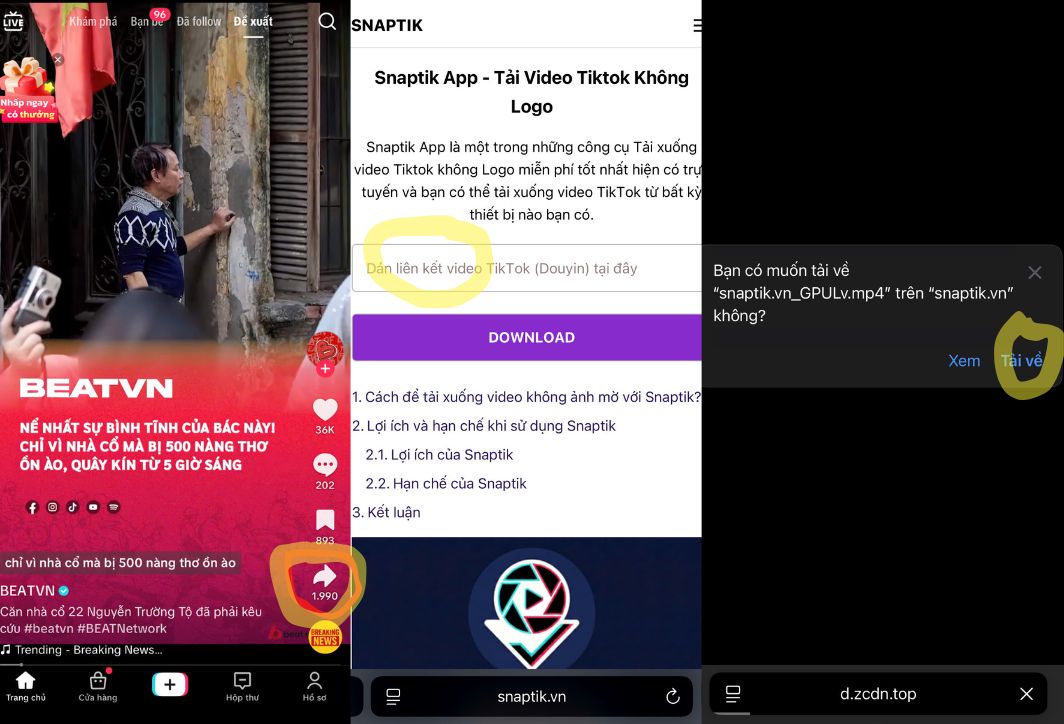
Simple steps on your smartphone to download videos without the TikTok logo.
How to download TikTok videos without watermarks on your computer extremely quickly.
If you're working on a PC or laptop, downloading TikTok videos without a watermark is even simpler and faster thanks to your browser's quick processing capabilities:
- Step 1: Access TikTok.com using your computer browser. Find the video you like.
- Step 2: Tap the share icon and select Copy linkAlternatively, you can directly copy the link from your browser's address bar.
- Step 3: Open a new tab and access the website. x2download.app or snaptik.app.
- Step 4: Paste the video link into the search box and press Enter. Get video link.
- Step 5: Select your desired format and press Enter. DownloadThe video will be saved directly to your computer's downloads folder in the highest possible original quality.
Top 5 best free TikTok video download tools without watermarks.
To ensure smooth video downloads, keep this list of backup tools handy in case some websites are under maintenance:
- SnapTik: Simple interface, fast processing speed, and support for Android applications.
- SSSTikTok: It allows unlimited video uploads and also supports converting videos to MP3 format.
- SaveTik: This tool is very powerful in maintaining HD audio and video quality.
- TikMate: A long-standing website, extremely stable, and with minimal annoying ads.
- MusicalDown: What's special about this website is that it can download videos even if the owner has turned off the "Allow saving" feature.
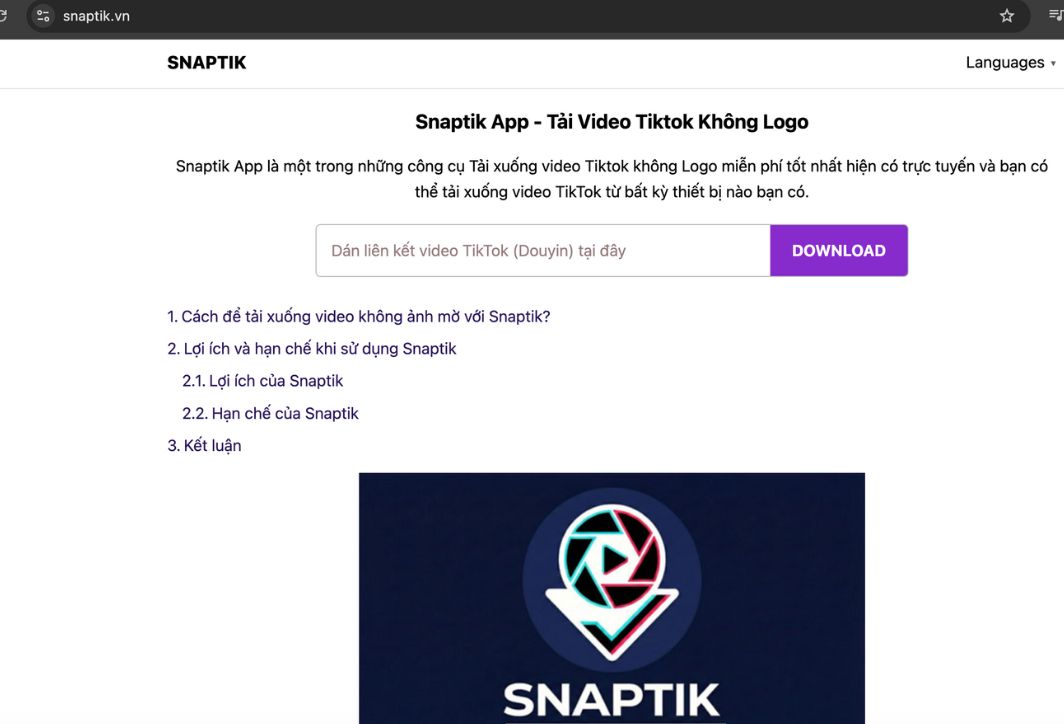
Snaptik is the most popular app used to download watermark-free videos from TikTok.
Using keyboard shortcuts for iPhone users.
If you're an iPhone user and want to download TikTok videos without a watermark more professionally without going to the website, use this smart shortcut:
- Search for the shortcut by name. "DTikTok" or "Mav Export" on iOS shortcut sharing communities.
- Add this shortcut to your gallery and grant it access to the photos.
- When watching videos on TikTok, you tap Share -> More -> Select the shortcut you have set.
- The video will be downloaded completely automatically and saved directly to your Photos app. This is the fastest method, exclusively for the iOS community.
Important copyright considerations when downloading TikTok videos.
While downloading TikTok videos without watermarks offers many benefits, you need to pay special attention to ethical and copyright issues:
- Respect the author: You should not use other people's videos to impersonate them or make illicit profits without their permission.
- Please credit the source if you share: If you repost the video on other platforms, please credit the original creator in the description to respect their creative work.
- Purpose of use: Downloaded videos should only be used for personal entertainment, learning, or creative reference purposes.
Common errors and how to fix them
Sometimes you might encounter difficulties uploading TikTok videos without a watermark. Don't worry, check the following factors:
- The video link is incorrect: Make sure you have copied the link correctly in the format https://vt.tiktok.com/….
- Video in private mode: You cannot download videos from locked (private) accounts.
- Internet connection: Make sure you have a stable Wi-Fi or 4G connection, as HD videos often have quite large file sizes.
- The browser is blocked: If the website isn't working, try clearing your web history or switching to a different browser like Brave or Firefox.
With the detailed instructions above, downloading TikTok videos without watermarks has become incredibly simple and anyone can do it. Just a few copy and paste steps, and you'll have high-quality, clean videos ready for your use. Choose the tool that best suits you and start capturing memorable moments today!





 English
  Vietnamese